
Share this content
Instagram is one of the leading digital engagement platforms, widely used by brands, influencers, and businesses to connect with their audience. However, obtaining and analyzing public data efficiently can be challenging. The Instagram Public Data connector for Google Looker Studio solves this problem by allowing users to access public account information directly on Google’s reporting platform.
With this connector, you can visualize and analyze key metrics to assess public profile performance, monitor competitors, track trends, and support strategic decisions based on concrete data. It is an indispensable tool for digital marketing professionals, data analysts, and managers looking to turn insights into effective actions.
Start using it now and simplify your Instagram data analysis!
Requirements to use the connector
- Google account to connect to Looker Studio and Pro Plugg;
- Instagram business account linked to a Facebook Business page de (learn more).
Facebook permissions
The connector needs access to the following information to function correctly:
- Profile and posts from the Instagram account linked to your Page;
- Statistics from the Instagram account linked to your Page;
- List of Pages you manage.
Report templates
Check out some available report templates:
Limitations
We use Instagram’s official API, the Graph API, which has some limitations:
- Retrieves public information only from business accounts and content creators on Instagram;
- Does not include data about Reels;
- Does not return information from Instagram business accounts with age restrictions;
- Fields that return aggregated values do not include data related to ads. For example, it counts comments on a photo but not comments on ads containing that photo (comments_count);
- Captions do not include user mentions (@) unless the application user has equivalent administrative permissions;
- The media_url field is omitted if the media contains copyrighted material or has been flagged for copyright violations.
Errors
ERROR #L001 - No Facebook business account was found with an Instagram business account linked to a Facebook Page.
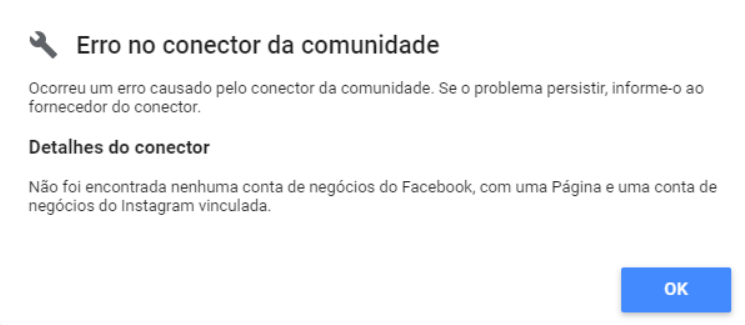
Solution:
- The Facebook account used to connect must be linked to a Facebook Business account;
- The Instagram account must be a business account;
- The Instagram account must be linked to a Facebook Page. See how to do it here.
Share this content
Latest content
Ready to automate your reporting?
Join data-driven teams who save 10+ hours per week.
NO CREDIT CARD REQUIRED